A QR code is a link whose address has been hidden inside a square. That makes the preview screen—not the printed logo—the moment to decide whether to continue.
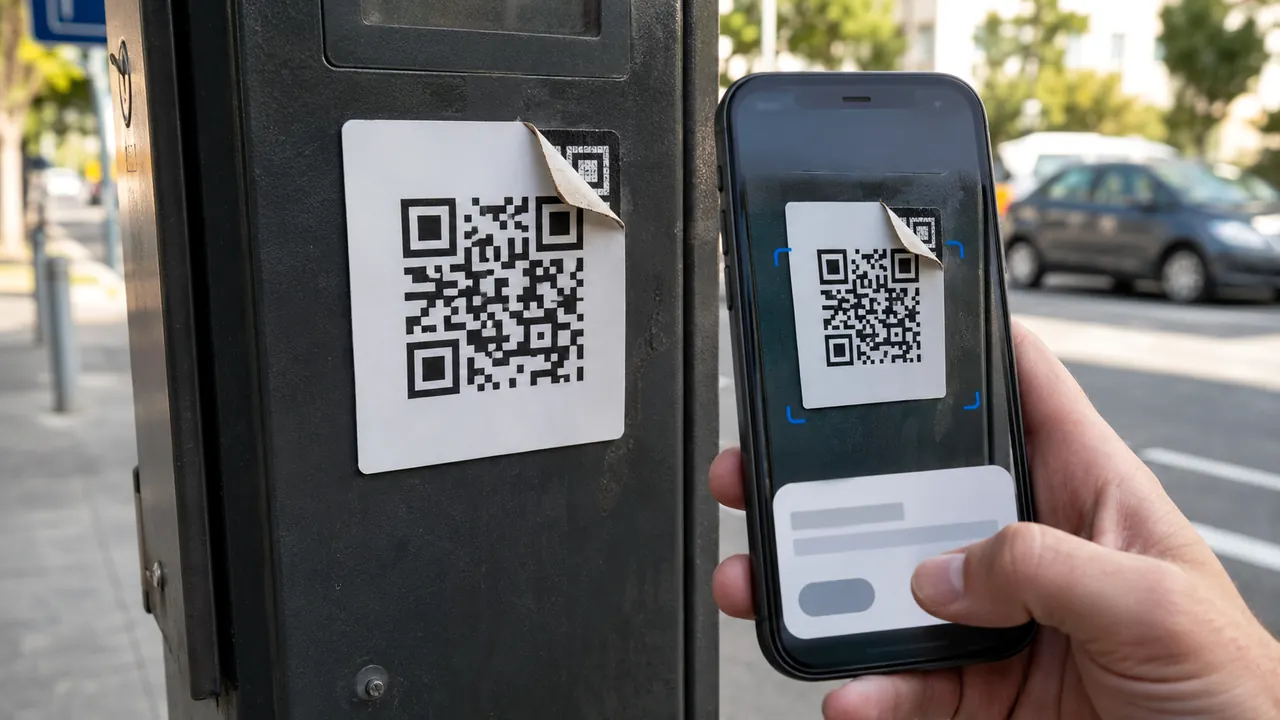
Treat a QR code as a concealed link: preview it, inspect its context, and use a known route for payments or logins. Context is part of verification. A code on a parking meter can be covered by a sticker; a code in an urgent text can route to a convincing imitation login page.
Know what the code should do before scanning. A restaurant menu should open a menu; a parking code should identify the operator and location before requesting an amount.
The preview is the checkpoint
Check whether a sticker covers an original code. Look for a sticker placed over another code, especially on parking meters, payment kiosks, and menus. Physical tampering changes the destination without changing the sign.
Read the destination before opening
Preview the destination before opening it
Use the camera preview to read the domain before opening it. Cancel if spelling, subdomain, or top-level domain differs from the organization you expected.
Read the domain from right to left to identify the real site
Read domains from the registered name outward: in login.example.com, example.com controls the site. A familiar word placed earlier in a longer domain proves nothing.
Open the known app directly for payment or account action
For payment or sign-in, close the preview and open the known app yourself. This removes the QR code from the trust chain.
Close the page if it asks for an unexpected download or profile
Reject pages that request a profile, APK, certificate, or surprise app installation. A menu, ticket, or parking code should not need control of the phone.
A malicious code does not need to look suspicious. It can sit on professional signage and open a polished HTTPS page. The mismatch between the expected organization and the actual registered domain is the useful clue.
Clues that the square was replaced
- HTTPS does not prove the operator is honest.
- A printed code can be replaced after a sign is installed.
- Urgency is a reason to slow down, not scan faster.
Close the page and use the company’s known app when a scan requests credentials, payment-card details, a configuration profile, or an unexpected download.
Safer routes for login and payment
Menus, limits, and recovery options change. Confirm the current steps in “Scammers hide harmful links in QR codes to steal your information” and “Malicious QR Codes Used to Steal Financial Data” before acting.
The FTC warns that malicious QR codes can send people to spoofed sites or trigger malware downloads.
The FBI advises checking a scanned URL for misspellings and avoiding payments through a site reached from an untrusted QR code.