A real refund should come from the original payment. Stop if anyone asks for a fee, verification payment, release payment, or support deposit.
Evidence used in this guide
Checked July 13, 2026 against Cash App's official wrong-account, cancellation, refund, scam, and support pages. The screenshots below show the public support pages behind specific claims; they are not a substitute for the screen shown in your own Cash App account.
What to do right now
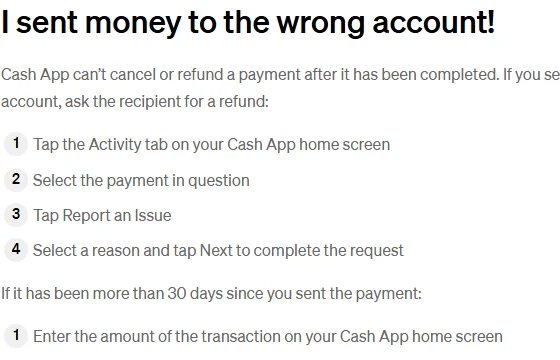
- Open Cash App and select Activity.Find the exact payment. Confirm the amount, recipient, date, and payment status.
- Open the payment details.Look for a Cancel option. Cash App says payments are instant and usually cannot be canceled, so the option may not appear.
- Cancel it if Cash App allows it.Use the in-app Cancel action immediately, then recheck Activity to confirm the status changed.
- If it completed, request a refund from the recipient.Ask for a refund from the original payment. Do not create a second payment to reverse the first one.
- Report the payment.Open the payment, select Report an Issue, choose the closest reason, and save screenshots of the payment details and conversation.
- Use official Cash App support if needed.Start from Cash App Support in the app or on Cash App's own help site. Do not trust phone numbers from ads, social comments, or random search results.
If the payment is pending
A pending payment is the best chance to stop the money from moving. Open the payment details and use Cancel if the app shows it. Closing the app, locking your card, or removing a bank account is not the same as canceling the transaction.
If the payment completed
Cash App's wrong-account help page says completed payments cannot be canceled or refunded by Cash App. The realistic path is to report the payment, request a refund from the recipient, and keep a record of every message and receipt.
Message you can send
I sent this Cash App payment to you by mistake. Please open the original payment in Activity, choose Refund, and confirm the refund. Please do not send a separate payment.
Keep the request short. Do not share your PIN, sign-in code, full card number, password, or other account credentials.
If this may be a scam
Stop communicating with anyone who asks for another payment, a verification deposit, a release fee, or access to your account. Cash App's scam guidance points users back to official support paths and warns against sending money to people you do not know.
If a linked bank account or card funded the payment, contact that financial institution and explain what happened. Be accurate: say whether you sent the payment yourself, whether it went to the wrong recipient, or whether someone tricked you into sending it.
How to contact real Cash App support
- Use Cash App's official Help Center.
- Cash App's support page lists (800) 969-1940 as its support number.
- Do not call numbers from sponsored search results, social replies, direct messages, or unofficial support pages.
- Cash App support should not ask you to send money, reveal your PIN, or provide a one-time sign-in code.
What recovery is not guaranteed
Reporting the payment does not guarantee that Cash App can reverse a completed transfer. The recipient may not respond, and the facts may not qualify for reimbursement. For a large loss, consider a police report and a consumer-protection report, then keep those records with your Cash App receipt.
How To Get Money Back On Cash App | Tech Insider
Use this only as a visual overview. Official Cash App help pages control if the video screen flow differs from your current app.
Video by Insider Tech. Watch on YouTube. Retrieved July 13, 2026.
Sources used
These are the support pages, screenshots, and optional video record used to build or illustrate the guide.
I sent money to the wrong account!
Completed Cash App payments generally cannot be canceled or refunded by Cash App, and the sender should report the payment or request a refund from the recipient.
Official Cash App Support documentation. Retrieved July 13, 2026.Canceling a Payment
Cash App payments are instant and usually cannot be canceled unless the app presents a cancel option.
Official Cash App Support documentation. Retrieved July 13, 2026.Refund a Payment
A recipient can refund a payment from the original transaction in Cash App Activity.
Official Cash App Support documentation. Retrieved July 13, 2026.Avoiding Common Scams with Cash App
Cash App warns users to communicate with Cash App Support only through official routes and to avoid sending money to people they do not know.
Official Cash App Support documentation. Retrieved July 13, 2026.Contact Cash App Support
Cash App lists in-app chat and (800) 969-1940 as official support contact routes.
Official Cash App Support documentation. Retrieved July 13, 2026.How To Get Money Back On Cash App | Tech Insider
A third-party walkthrough can help readers recognize the refund and support ideas visually, but official Cash App documentation controls when details differ.
YouTube video by Insider Tech. Retrieved July 13, 2026.Product screens and policies can change. Use the linked Cash App pages to confirm the current options shown in your own account.